Windows Codex 出现CreateProcessAsUserW failed: 5 解决方法如下: 更改 config.toml [windows] sandbox = "unelevated"

@echo off setlocal enabledelayedexpansion set "SRC=D:\backup" set "DEST=E:\server_backup" if not exist "%DEST%" mkdir "%DEST%" echo ===== Copy backup files (skip existing) ===== REM 复制文件(存在则跳过,不覆盖) robocopy "%SRC%" "%DEST%" backup_*.zip /XO /R:0 /W:0 >nul echo ===== Keep only latest 10 files ===== REM 获取文件列表(按时间排序:最新在后面) set count=0 for /f "delims=" %%F in ('dir "%DEST%\backup_*.zip" /b /o:-d') do ( set /a count+=1 if !count! GTR 10 ( del /f /q "%DEST%\%%F" ) ) echo Done. endlocal
@echo off setlocal enabledelayedexpansion set SRC=SharedFiles\Quickbooks DATA set BACKUP=D:\backup set TMP=D:\QB_TMP set FILE_FILTER=*.qbw* set BACKUP_PREFIX=backup_ for /f %%i in ('powershell -NoProfile -Command "Get-Date -Format yyyy-MM-dd_HH-mm-ss"') do set DT=%%i set ZIP=%BACKUP%\%BACKUP_PREFIX%%DT%.zip if not exist "%TMP%" mkdir "%TMP%" if not exist "%BACKUP%" mkdir "%BACKUP%" echo ===================================== echo 1. Create VSS snapshot echo ===================================== ( echo SET CONTEXT PERSISTENT NOWRITERS echo ADD VOLUME D: ALIAS QBVOL echo CREATE echo EXPOSE %%QBVol%% X: ) > "%TMP%\vss.txt" diskshadow /s "%TMP%\vss.txt" echo ===================================== echo 2. Copy from VSS (X:) echo ===================================== robocopy "X:\%SRC%" "%TMP%" %FILE_FILTER% /R:1 /W:1 echo ===================================== echo 3. Remove snapshot (safe) echo ===================================== echo DELETE SHADOWS ALL > "%TMP%\vss_del.txt" diskshadow /s "%TMP%\vss_del.txt" echo ===================================== echo 4. Compress with PowerShell echo ===================================== powershell -NoProfile -Command "Compress-Archive -Path '%TMP%\*.qbw*' -DestinationPath '%ZIP%' -Force" echo ===================================== echo 5. Cleanup temp echo ===================================== rmdir /s /q "%TMP%" echo ===================================== echo 6. Keep last 10 backups echo ===================================== cd /d "%BACKUP%" for /f "skip=10 delims=" %%f in ('dir %BACKUP_PREFIX%*.zip /b /o-d') do ( del "%%f" ) echo DONE endlocal
@echo off setlocal enabledelayedexpansion :: ===== 自动提权 ===== net session >nul 2>&1 if %errorlevel% neq 0 ( powershell -Command "Start-Process cmd -ArgumentList '/c %~f0' -Verb RunAs" exit ) :: ===== hosts 文件 ===== set "HOST_FILE=%SystemRoot%\System32\drivers\etc\hosts" set "TMP_FILE=%HOST_FILE%.tmp" :: ===== 去掉只读 ===== attrib -r "%HOST_FILE%" :: ===== 拷贝原 hosts 到临时文件 ===== copy /Y "%HOST_FILE%" "%TMP_FILE%" >nul :: ===== 要添加/更新的记录 ===== ( echo 127.0.0.1 www.2brightsparks.com echo 127.0.0.1 dbinternal.2brightsparks.com ) > "%HOST_FILE%.list" :: ===== 处理每条记录 ===== for /f "usebackq tokens=1,* delims= " %%i in ("%HOST_FILE%.list") do ( set "IP=%%i" set "DOMAIN=%%j" set "FOUND=0" set "NEW_TMP=%TMP_FILE%.new" if exist "!NEW_TMP!" del /f /q "!NEW_TMP!" :: 遍历原临时文件 for /f "usebackq delims=" %%L in ("%TMP_FILE%") do ( set "LINE=%%L" echo !LINE! | findstr /R /C:"[ ]!DOMAIN!" >nul if !errorlevel! EQU 0 ( echo !IP! !DOMAIN!>>"!NEW_TMP!" set "FOUND=1" ) else ( echo !LINE!>>"!NEW_TMP!" ) ) :: 如果没有找到域名,追加 if !FOUND! EQU 0 ( echo !IP! !DOMAIN!>>"!NEW_TMP!" ) move /Y "!NEW_TMP!" "%TMP_FILE%" >nul echo Added/Updated !IP! !DOMAIN! ) :: ===== 写回 hosts ===== move /Y "%TMP_FILE%" "%HOST_FILE%" >nul :: ===== 删除临时 list ===== del /f /q "%HOST_FILE%.list" :: ===== 恢复只读 ===== :: attrib +r "%HOST_FILE%" :: ===== 刷新 DNS ===== ipconfig /flushdns echo ==== Done ==== pause
powershell reg add "HKCU\Software\Classes\CLSID\{86ca1aa0-34aa-4e8b-a509-50c905bae2a2}\InprocServer32" /f /ve
visual studio 2026 winform designer illegal characters in path 解决方法 修改文件 C:\Program Files\Microsoft Visual Studio\18\Community\Common7\IDE\devenv.exe.config
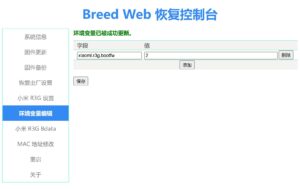
小米路由器hd-pro刷了Breed后,再刷openwrt后无法启动问题解决方法 在Breed Web恢复控制台中的 环境变量编辑中 添加字段 xiaomi.r3g.bootfw 值为 2 就可以了。
Rocky Linux 9 自动登录 只要在 /etc/gdm/custom.conf文件中的加下以下语句 [daemon] AutomaticLogin=用户名 AutomaticLoginEnable=True
CS-CART 种类页显示 add to cart按纽 /design/themes/responsive/templates/blocks/product_list_templates/products_multicolumns.tpl show_add_to_cart=$show_add_to_cart|default:false 改成 show_add_to_cart=$show_add_to_cart|default:true